---
title: Say Hello to your Nexus AI™ Scribe
description: Explore the new look of Nexus AI™ Scribe.
---
[Skip to content](https://info.wellstar.health/knowledge-base/-say-hello-to-your-nexus-ai-scribe#main-content)
English - Canada
Show submenu for translations
[](https://nexusai.wellstar.health/)
- [Home](https://nexusai.wellstar.health/)
- [Support](https://nexusai.wellstar.health/support/)
- [Resources](https://wellstar.health/resources/)
Open main navigation
Close main navigation
- [Home](https://nexusai.wellstar.health/)
- [Support](https://nexusai.wellstar.health/support/)
- [Resources](https://wellstar.health/resources/)
- English - Canada
Show submenu for translations
- [Book a 1:1 Support Session](https://calendly.com/nexus-ai-support-team)
[Book a 1:1 Support Session](https://calendly.com/nexus-ai-support-team)
How can we help you?
- There are no suggestions because the search field is empty.
1. [Nexus AI™ Knowledge Base](https://info.wellstar.health/knowledge-base?hsLang=en-ca)
2. [Getting started](https://info.wellstar.health/knowledge-base/getting-started?hsLang=en-ca)
# Say Hello to your Nexus AI™ Scribe
The new Nexus AI™ Scribe experience has been redesigned to make it easier and faster for providers to start an encounter, capture patient conversations, and generate clinical notes with fewer clicks.
The updated screen brings the key actions into one clean workspace, helping providers move from encounter start to completed note more efficiently.
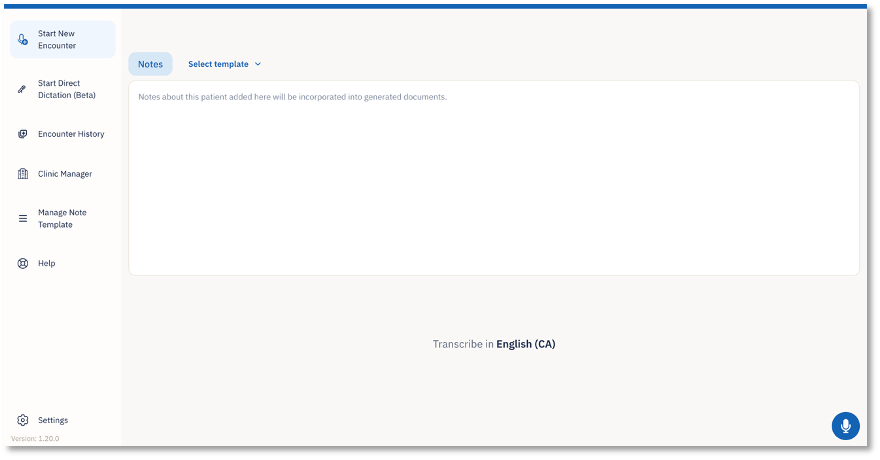
**What’s new on this screen?**
The new Scribe screen is designed to keep the encounter workflow simple and focused. From this screen, you can:
- Start a new patient encounter.
- Select the note template you want to use.
- Add any relevant pre-encounter notes.
- Confirm the transcription language.
- Begin recording the patient conversation.
- Access encounter history, templates, settings, and support from the left navigation menu.
**Left navigation menu**
The left navigation menu gives quick access to commonly used Scribe areas:
- **Start New Encounter**: Begin a new patient consultation.
- **Start Direct Dictation (Beta)**: Start a direct dictation workflow.
- **Encounter History**: View previously captured encounters.
- **Clinic Manager**: Access clinic-related management options.
- **Manage Note Template**: View or manage note templates.
- **Help**: Access support or help resources.
- **Settings**: Manage user or application settings.
- [Getting started](https://info.wellstar.health/knowledge-base/getting-started?hsLang=en-ca)
- [Settings](https://info.wellstar.health/knowledge-base/settings?hsLang=en-ca)
- [How To](https://info.wellstar.health/knowledge-base/how-to?hsLang=en-ca)
- [Troubleshooting](https://info.wellstar.health/knowledge-base/troubleshooting?hsLang=en-ca)
- [Home](https://nexusai.wellstar.health/)
- [Support](https://nexusai.wellstar.health/support/)
- [Resources](https://wellstar.health/resources/)
[](https://nexusai.wellstar.health)
[mailto:help@wellstar.health](mailto:help@wellstar.health)
Copyright © 2026, WELLSTAR Technologies