---
title: How to add Nexus AI™ Scribe to your Mobile Home Screen
description: Easily access Nexus AI Scribe from the home screen of your mobile phone.
---
[Skip to content](https://info.wellstar.health/knowledge-base/how-to-add-nexus-ai-scribe-to-your-mobile-home-screen#main-content)
English - Canada
Show submenu for translations
[](https://nexusai.wellstar.health/)
- [Home](https://nexusai.wellstar.health/)
- [Support](https://nexusai.wellstar.health/support/)
- [Resources](https://wellstar.health/resources/)
Open main navigation
Close main navigation
- [Home](https://nexusai.wellstar.health/)
- [Support](https://nexusai.wellstar.health/support/)
- [Resources](https://wellstar.health/resources/)
- English - Canada
Show submenu for translations
- [Book a 1:1 Support Session](https://calendly.com/nexus-ai-support-team)
[Book a 1:1 Support Session](https://calendly.com/nexus-ai-support-team)
How can we help you?
- There are no suggestions because the search field is empty.
1. [Nexus AI™ Knowledge Base](https://info.wellstar.health/knowledge-base?hsLang=en-ca)
2. [How To](https://info.wellstar.health/knowledge-base/how-to?hsLang=en-ca)
# How to add Nexus AI™ Scribe to your Mobile Home Screen
To make accessing Nexus AI quick and easy, you can save the app to your phone’s home screen just like any other app. Follow the steps below based on your device type.
Nexus AI Standalone URL:
[**https://nexus-app.wellstar.health**](https://nexus-app.wellstar.health/)
### For iPhone Users
1\. Open **Chrome** and navigate to: [https://nexus-app.wellstar.health](https://nexus-app.wellstar.health/)
2\. Tap the Share icon (a square with an arrow pointing up).

3\. Scroll down and tap "Add to Home Screen."
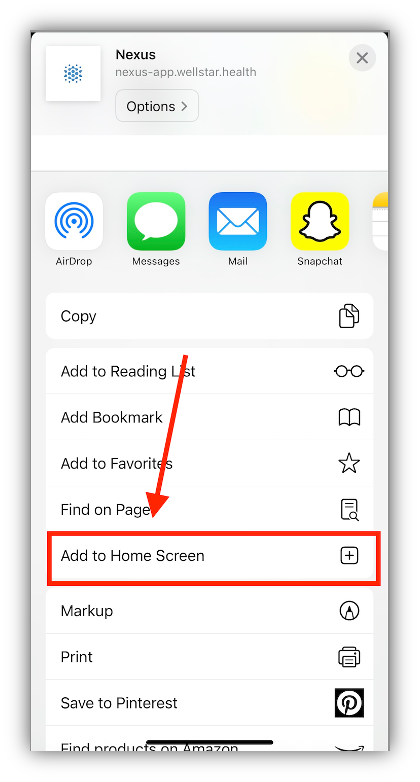
4\. Optionally, rename the shortcut to "Nexus AI", then tap Add in the top right.
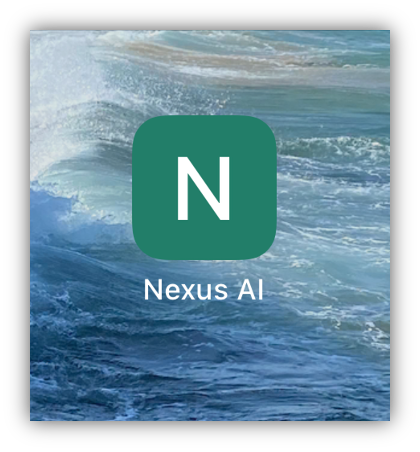
You’ll now see a Nexus AI icon on your home screen—just like an app.
### For Android Users
1\. Open **Chrome** and go to: [https://nexus-app.wellstar.health](https://nexus-app.wellstar.health/)
2\. Tap the three-dot menu in the top-right corner of the browser.

3\. Select "Add to Home screen" from the dropdown menu.
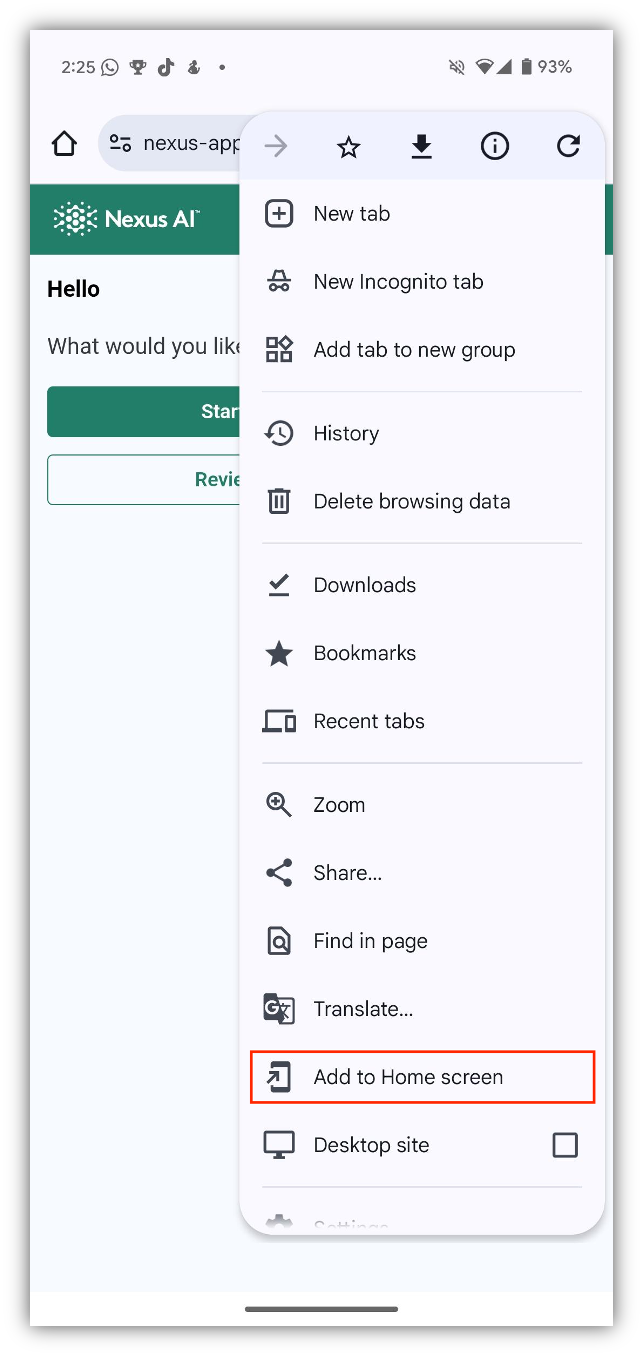
3\. Optionally, rename the shortcut to "Nexus AI", then tap Add.
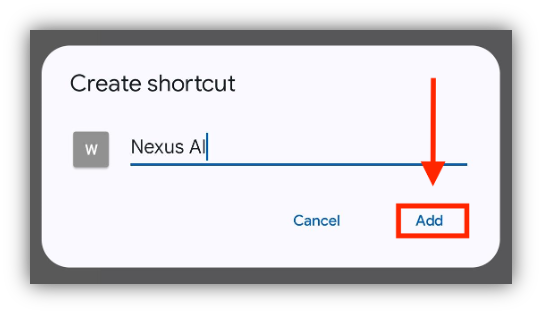
4\. Click Add to home screen.

You’ll now see a Nexus AI icon on your home screen—just like an app.

### Need Help?
📧 Email: [help@wellstar.health](mailto:%20help@wellstar.health)
📅 Book support: [https://calendly.com/nexus-ai-support-team](https://calendly.com/nexus-ai-support-team)
- [Getting started](https://info.wellstar.health/knowledge-base/getting-started?hsLang=en-ca)
- [Settings](https://info.wellstar.health/knowledge-base/settings?hsLang=en-ca)
- [How To](https://info.wellstar.health/knowledge-base/how-to?hsLang=en-ca)
- [Troubleshooting](https://info.wellstar.health/knowledge-base/troubleshooting?hsLang=en-ca)
- [Home](https://nexusai.wellstar.health/)
- [Support](https://nexusai.wellstar.health/support/)
- [Resources](https://wellstar.health/resources/)
[](https://nexusai.wellstar.health)
[mailto:help@wellstar.health](mailto:help@wellstar.health)
Copyright © 2026, WELLSTAR Technologies