---
title: How to Update Your Language Settings in Nexus AI™Scribe
description: Nexus AI™ Scribe supports 35+ languages. Learn how to set your Speech Language and Language of Note.
---
[Skip to content](https://info.wellstar.health/knowledge-base/how-to-update-your-language-settings-in-nexus-aiscribe#main-content)
English - Canada
Show submenu for translations
[](https://nexusai.wellstar.health/)
- [Home](https://nexusai.wellstar.health/)
- [Support](https://nexusai.wellstar.health/support/)
- [Resources](https://wellstar.health/resources/)
Open main navigation
Close main navigation
- [Home](https://nexusai.wellstar.health/)
- [Support](https://nexusai.wellstar.health/support/)
- [Resources](https://wellstar.health/resources/)
- English - Canada
Show submenu for translations
- [Book a 1:1 Support Session](https://calendly.com/nexus-ai-support-team)
[Book a 1:1 Support Session](https://calendly.com/nexus-ai-support-team)
How can we help you?
- There are no suggestions because the search field is empty.
1. [Nexus AI™ Knowledge Base](https://info.wellstar.health/knowledge-base?hsLang=en-ca)
2. [Settings](https://info.wellstar.health/knowledge-base/settings?hsLang=en-ca)
# How to Update Your Language Settings in Nexus AI™Scribe
To change your language settings, click the three bars at the top right of your application and navigate to **Settings** to open your preferences.
Scroll down to find the **Speech Languages** and **Language of Note** sections. Use the dropdown menus in each section to customize your language settings.
###  **Speech Languages**
- You can choose up to **four languages.**
- Make sure you select these **before** starting a session in those languages to ensure proper functionality.
### **Language of Note**
This option sets the language for your notes and any content generated by the tool.
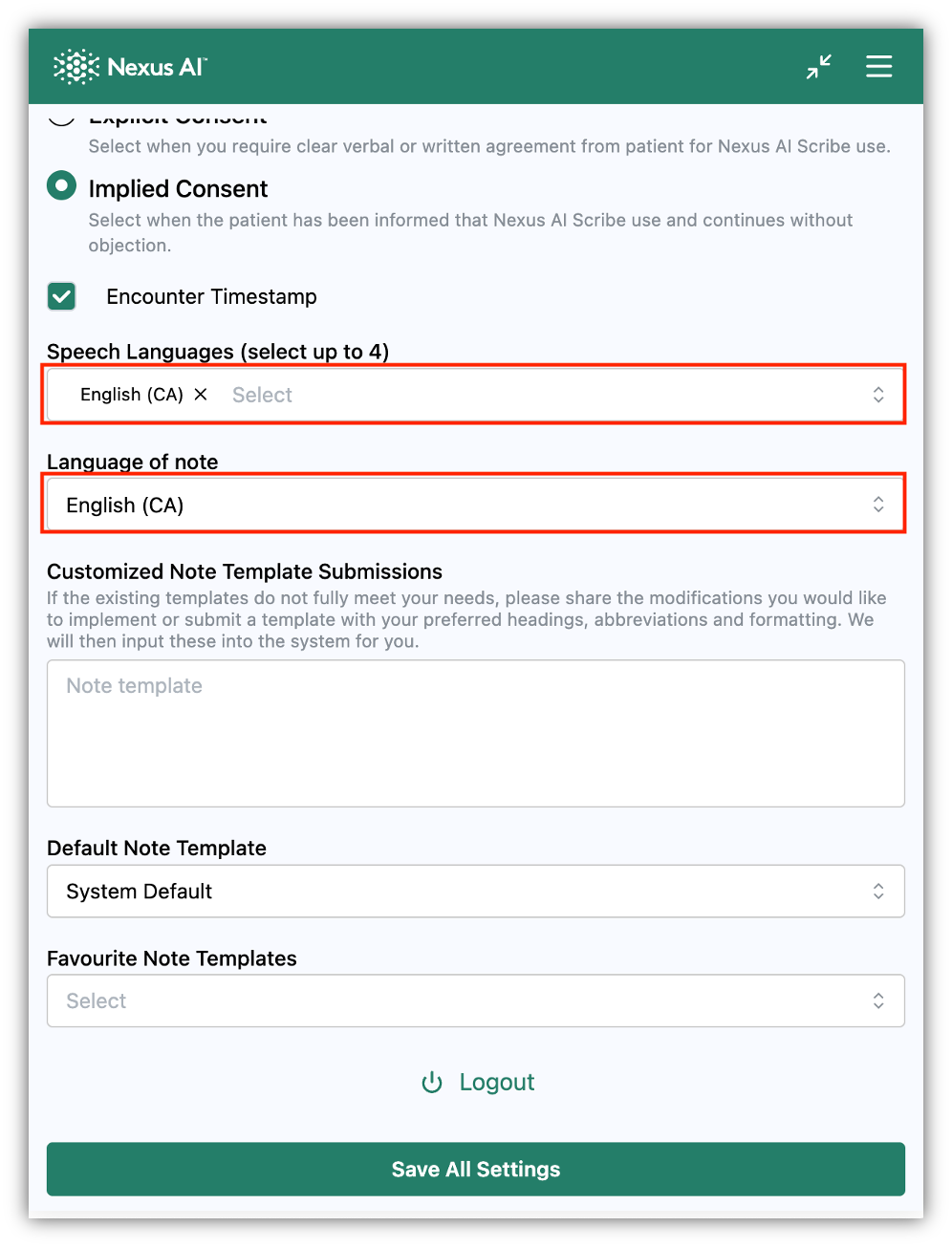
**Important:** After making any changes, scroll to the bottom of the page and click **Save All Settings** to apply them.

### Need Help?
📧 Email: [help@wellstar.health](mailto:%20help@wellstar.health)
📅 Book support: [https://calendly.com/nexus-ai-support-team](https://calendly.com/nexus-ai-support-team)
- [Getting started](https://info.wellstar.health/knowledge-base/getting-started?hsLang=en-ca)
- [Settings](https://info.wellstar.health/knowledge-base/settings?hsLang=en-ca)
- [How To](https://info.wellstar.health/knowledge-base/how-to?hsLang=en-ca)
- [Troubleshooting](https://info.wellstar.health/knowledge-base/troubleshooting?hsLang=en-ca)
- [Home](https://nexusai.wellstar.health/)
- [Support](https://nexusai.wellstar.health/support/)
- [Resources](https://wellstar.health/resources/)
[](https://nexusai.wellstar.health)
[mailto:help@wellstar.health](mailto:help@wellstar.health)
Copyright © 2026, WELLSTAR Technologies